Clean API Layer in Node.js with mvc-front-sdk
Most Node.js projects end up with API calls scattered across files — fetch calls living in components, service files with no clear structure, and token management duplicated everywhere. mvc-front-sdk is a small library I built to fix that. It gives you a structured, type-safe controller pattern that works in any JavaScript environment, including plain Node.js.
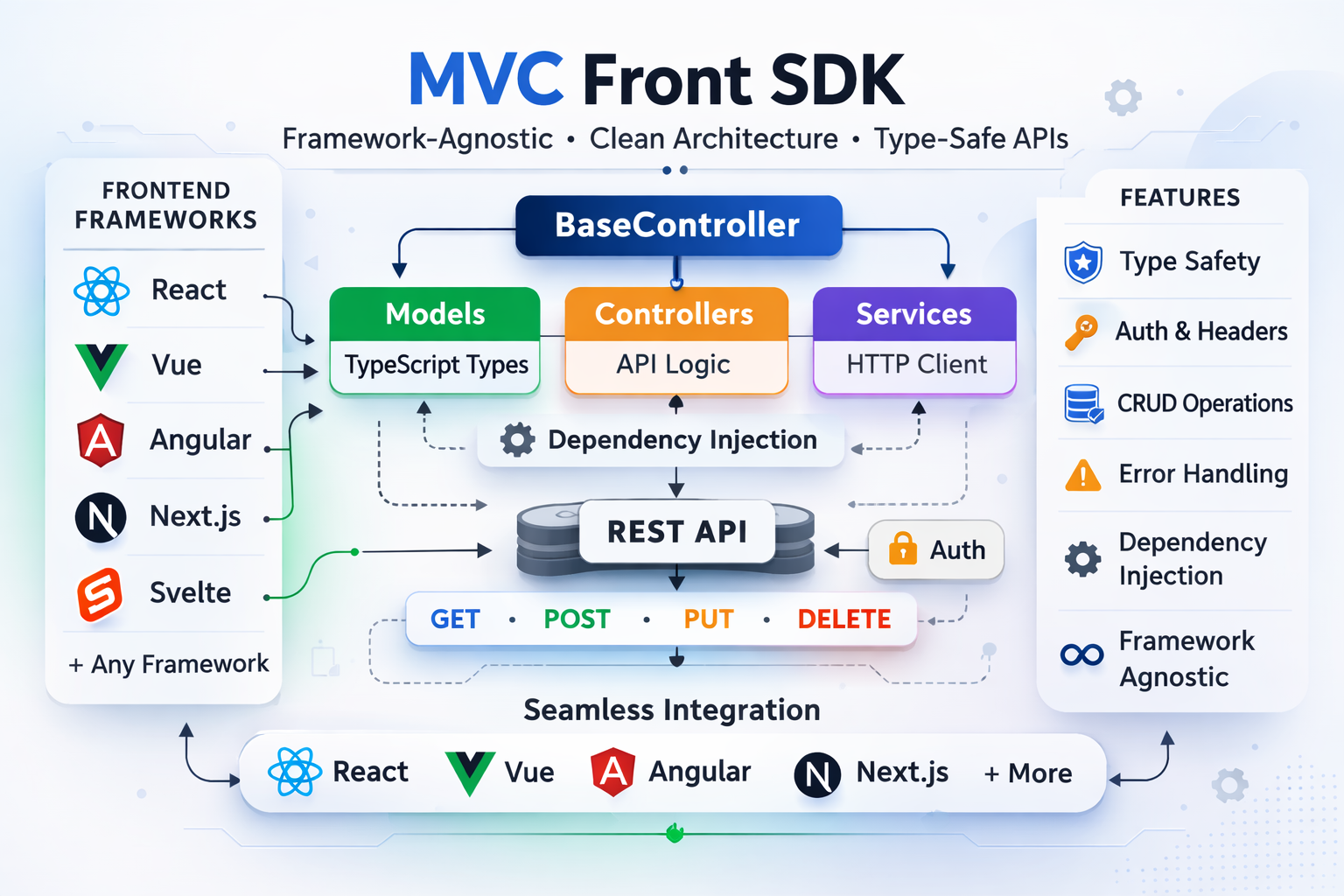
Why this approach
Last time, I shared the package itself.
In this article, the goal is practical: implement a clean MVC-style API layer end-to-end in a TypeScript project.
Without structure, API code usually spreads across components and scripts:
const res = await fetch(`${BASE_URL}/users/${id}`, {
  headers: { Authorization: `Bearer ${token}` },
});
const user = await res.json();
With mvc-front-sdk, we keep API concerns inside controllers, keep models typed, and let views/components focus on rendering.
From installation to implementation
1) Install and set up environment
npm install mvc-front-sdk
# or
pnpm add mvc-front-sdk
Requirements: Node.js >= 18, TypeScript ^5.
Create environment variables:
API_BASE_URL=https://api.example.com
API_TOKEN=your_optional_token
2) Recommended project structure
src/
├── models/
│   └── user.model.ts
├── controllers/
│   └── user.controller.ts
├── views/
│   └── users-list.view.tsx
├── scripts/
│   └── sync-users.ts
└── index.ts
This keeps MVC explicit:
- Model = data types and DTOs
- Controller = API logic
- View = component consuming controller output
3) Create the model (TypeScript types)
// src/models/user.model.ts
export type User = {
  id: string;
  name: string;
  email: string;
};

export type CreateUserDto = {
  name: string;
  email: string;
};

export type UserFilters = {
  page?: number;
  limit?: number;
  name?: string;
};
4) Create the controller (API layer)
// src/controllers/user.controller.ts
import { BaseController } from "mvc-front-sdk";
import type { CreateUserDto, User, UserFilters } from "../models/user.model";

export class UserController extends BaseController {
  constructor(token?: string) {
    super(process.env.API_BASE_URL!, token ?? process.env.API_TOKEN);
  }

  async getAll(filters?: UserFilters) {
    const params = this.buildSearchParams(filters, {
      rename: { name: "fullName" },
    });
    const url = this.createURL("/users", params);
    return this.apiService.get<User[]>(url);
  }

  async getById(id: string) {
    return this.apiService.get<User>(`/users/${id}`);
  }

  async create(data: CreateUserDto) {
    return this.apiService.post<User>("/users", data);
  }

  async update(id: string, data: Partial<User>) {
    return this.apiService.put<User>(`/users/${id}`, data);
  }

  async remove(id: string) {
    return this.apiService.delete(`/users/${id}`);
  }
}
5) Create the view component (uses controller)
Here the component is the View: it asks the controller for data and renders it.
// src/views/users-list.view.tsx
import { useEffect, useMemo, useState } from "react";
import { UserController } from "../controllers/user.controller";
import type { User } from "../models/user.model";

export function UsersListView() {
  const [users, setUsers] = useState<User[]>([]);
  const [loading, setLoading] = useState(true);
  const [error, setError] = useState<string | null>(null);

  const controller = useMemo(() => new UserController(), []);

  useEffect(() => {
    async function load() {
      try {
        const data = await controller.getAll({ page: 1, limit: 20 });
        setUsers(data);
      } catch (err) {
        setError(err instanceof Error ? err.message : "Failed to load users");
      } finally {
        setLoading(false);
      }
    }
    void load();
  }, [controller]);

  if (loading) return <p>Loading users...</p>;
  if (error) return <p>{error}</p>;

  return (
    <ul>
      {users.map((user) => (
        <li key={user.id}>
          {user.name} - {user.email}
        </li>
      ))}
    </ul>
  );
}
6) Use the same controller in Node.js scripts
Controllers are reusable outside UI components:
// src/scripts/sync-users.ts
import { UserController } from "../controllers/user.controller";

const users = new UserController();

async function run() {
  const list = await users.getAll({ page: 1, limit: 50 });
  console.log(`Fetched ${list.length} users`);

  const newUser = await users.create({
    name: "John Doe",
    email: "john.doe@example.com",
  });

  console.log("Created:", newUser.id);
}

void run();
Query parameters with buildSearchParams
The buildSearchParams helper converts a plain object into URLSearchParams, with support for renaming keys and custom transforms:
const params = this.buildSearchParams(
  { name: "Fariol", page: 1, tags: ["ts", "node"] },
  {
    rename: { name: "fullName" }, // rename key before sending
    transform: { page: (v) => String(v) },
  },
);
// → fullName=Fariol&page=1&tags=ts,node
Then compose the URL:
const url = this.createURL("/users", params);
// → /users?fullName=Fariol&page=1&tags=ts,node
Default headers
If your API requires versioning headers or a client ID on every request, pass them once in the constructor:
super("https://api.example.com", process.env.API_TOKEN, {
  "X-API-Version": "v1",
  "X-Client-ID": "my-node-service",
});
Headers passed directly to apiService.get(...) will override defaults for that specific call:
await this.apiService.get("/users", {
  "X-API-Version": "v2", // overrides v1 for this request only
});
Error handling with ApiError
The SDK throws typed ApiError instances, so you can handle HTTP errors explicitly:
import { ApiError } from "mvc-front-sdk";

try {
  await users.getById("nonexistent-id");
} catch (error) {
  if (error instanceof ApiError) {
    console.error(error.statusCode); // e.g. 404
    console.error(error.message); // error message
    console.error(error.isUnAuthenticated()); // true if 401
  }
}
Or delegate to the built-in handler inside your controller:
async getById(id: string) {
  try {
    return await this.apiService.get<User>(`/users/${id}`);
  } catch (error) {
    this.handleError(error); // re-throws with formatted message
  }
}
Dynamic token refresh
If your token expires during a session (e.g. after a login/refresh flow), update it at runtime without recreating the controller:
export class AuthController extends BaseController {
  constructor() {
    super("https://api.example.com");
  }

  async login(email: string, password: string) {
    const { token } = await this.apiService.post<{ token: string }>(
      "/auth/login",
      { email, password },
    );
    this.apiService.setToken(token);
    return token;
  }

  logout() {
    this.apiService.setToken(undefined);
  }
}
FormData support
File uploads work out of the box — pass a FormData instance as the body:
async uploadAvatar(userId: string, file: File) {
  const form = new FormData();
  form.append("file", file);
  form.append("userId", userId);
  return this.apiService.post<{ url: string }>("/upload", form);
}
Practical MVC checklist
- Model types are defined in
models/ - API calls live in controllers only
- Views/components never call
fetchdirectly - Scripts and views reuse the same controller classes
- Error handling and auth token logic stay centralized
Source
The library is open source. You can find it on GitHub and install it from npm as mvc-front-sdk.